
Are you tired of your notetaking workspace looking like the waiting room of a dentist’s office?
As someone who’s both color-obsessed and easily overstimulated, I’ve spent more time than I’d like to admit tweaking Obsidian to get the right balance of “this sparks joy” and “doesn’t overwhelm my nervous system.”
So I put my theme-scouting hat on and dug through the Obsidian theme repository to bring you five options that work well for easily overwhelmed, color-loving brains.
Each one offers some combination of bold palettes, mellow contrast, and layout tweaks that can make your workspace feel more inviting. (Less dentist’s office, more narwhal tap-dancing on a rainbow.)
If you’ve been hunting for colorful Obsidian themes that don’t blast your eyeballs but are also more interesting than your local post office, read on.

5 Colorful Obsidian Themes (That Are Easy on the Eyes and Brain)
1 | Royal Velvet
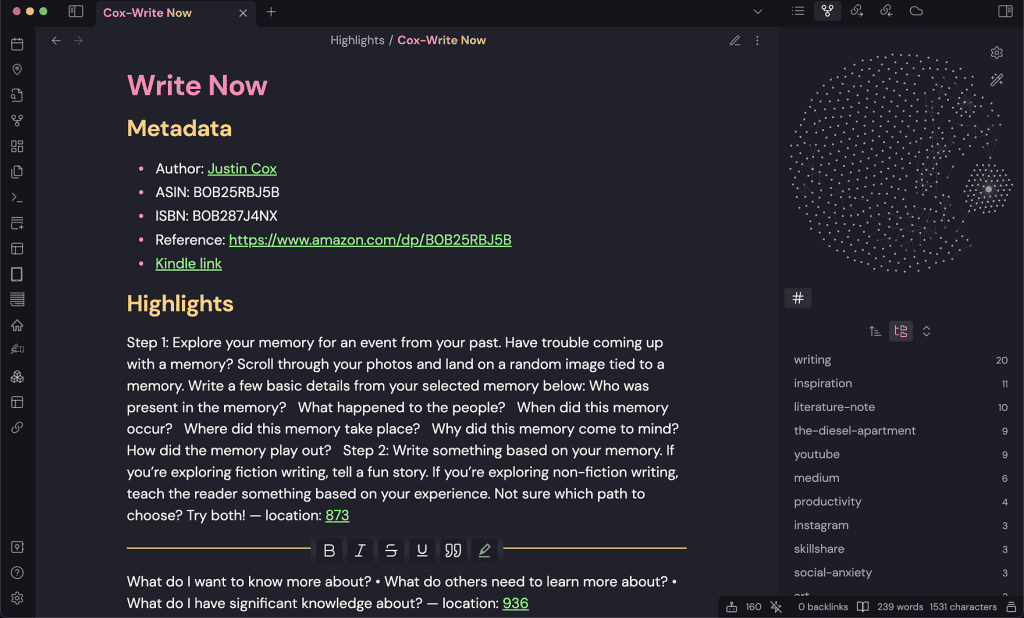
Inspired by the natural glass royal velvet obsidian, this theme blends bold and deep colors, creating an engaging and easy environment for the eyes.
But it’s not just the color palette that makes this theme unique . It also comes with a set of customization options that allow you adjust your workspace.
You can use the style settings plugin to experiment with different fonts, line spacing, and other design elements.
One customization option I love is the ability to choose the color of your inline document titles. By default, they’ll match the color of your heading level, but you can also disable this or choose a custom hue based on your accent color.
Learn more about Royal Velvet theme here
2 | Night Owl
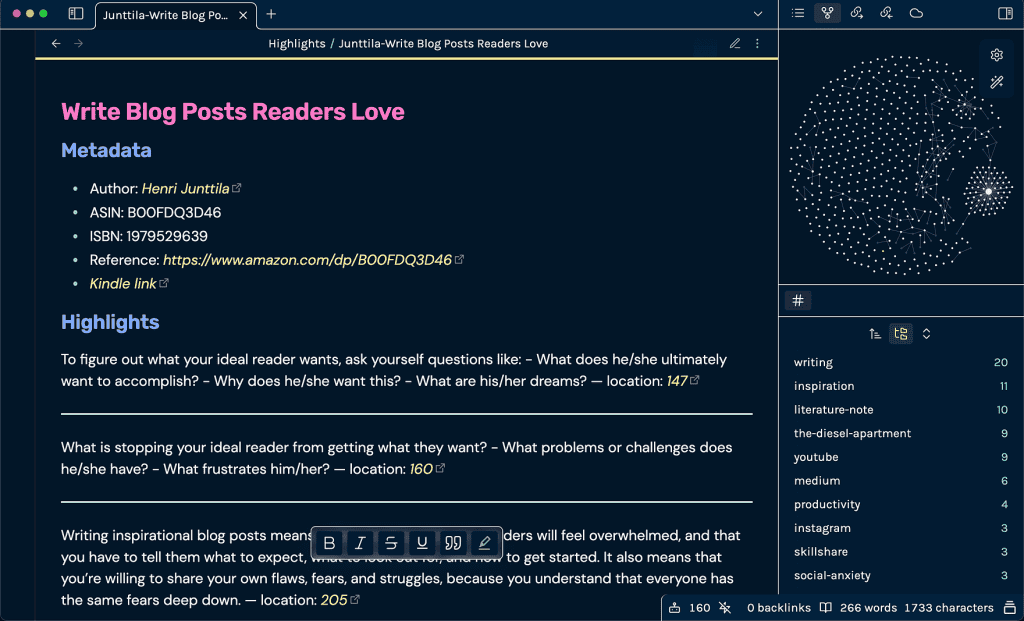
Inspired by the VSCode Night Owl theme by Sarah Drasner, Obsidian Night Owl offers a bunch of customization options to help you create a workspace that’s aesthetically yours.
Night Owl theme uses a dual font family system, making distinguishing between headings and regular text easy. Headings are rendered in the Rubik font, while body text is displayed in Karla.
Night Owl theme is a terrific option for anyone who wants to inject personality into their Obsidian workspace.
With its sleek typography and customizations, it’s a great way to make your writing environment feel more inspiring.
Learn more about Night Owl theme here
3 | AnuPpuccin
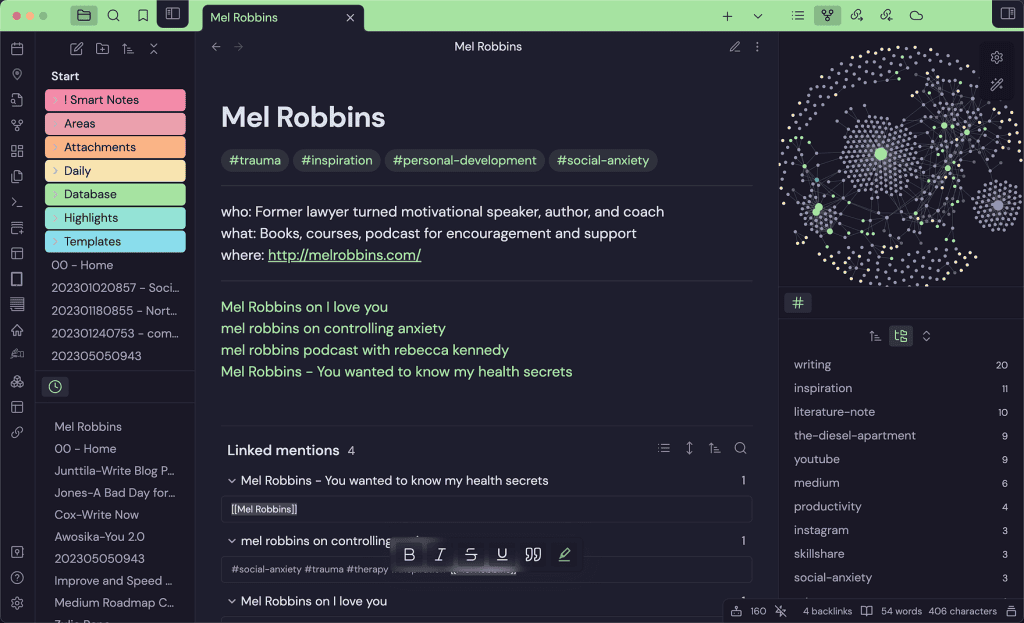
AnuPpuccin is the theme for writers who want complete control over their workspace.
You can dial it in to your style with a wide range of fun color palettes. But the customization options don’t stop there.
One of the features of this theme I love is the ability to toggle rainbow folders. Whether you’re working on multiple projects or need visual help keeping things organized, this feature will become your bestie.
AnuPpuccin also offers customizable decorations like bold and italic colors, giving you even more control over the aesthetics of your workspace. And if that’s not enough, you can also create custom callout styles to make important notes stand out.
You can tweak everything from font sizes to line spacing using the style settings plugin. And with a range of custom options, you’ll be able to make your workspace unique.
Learn more about AnuPpuccin theme here
4 | Everforest

The Everforest theme is the perfect choice for anyone who wants to add some much-needed color and warmth to their workspace in Obsidian.
The green-based color scheme has a warm tone, making it easy on the eyes and helping to prevent eye fatigue, especially during extended writing sessions.
This theme’s soft contrast is perfect for notetakers who want to protect their eyes while working in a visually stimulating environment.
Additionally, the Everforest theme is flexible. Whether you want to change the font, adjust the color scheme, or experiment with other design elements, it has you covered.
With rich support for common file types, Everforest is perfect for writers who need a versatile workspace. And with semantic highlighting and italic support, it’s easy to keep your files organized and easy to read.
Learn more about Everforest theme here
5 | Obsidianite

Obsidianite theme is the perfect choice for anyone who wants a dark but not dull theme.
The theme’s dark design is easy on the eyes, making it ideal for long notetaking or writing sessions. The simple design makes sure the interface doesn’t distract you.
Despite its simplicity, Obsidianite features gradient headers that add a touch of elegance to the design.
The theme is fully customizable, and you can adjust the font size, line height, and color scheme to create a notetaking workspace that fits your needs.
Learn more about Obsidianite theme here
If you love color but don’t want your workspace to feel like a carnival ride, these themes give you plenty of room to try things out without feeling overwhelmed.
Each of them offers unique features and customization options to help you create a writing space that’s visually appealing and functional.
Whether you prefer bold and deep colors, warm and soft tones, or sparkly accents, one of these Obsidian themes will be perfect for you. (Or you can switch between them when you get bored like I do.)
Now go forth and make your workspace look like it was designed by a unicorn with a graphic design degree!
Once your digital workspace looks the way you want it, you might be ready to tackle your offline writing and notetaking setup.
When my brain does this, I use that
If your brain runs 12 tabs and forgets what it opened the first one for, this free guide is for you. I’m AuDHD and these are the 10 tools I use every day.
Browser extensions, apps, and websites that work with a neurodivergent brain instead of against it.